Dashboard (home)
The Dashboard is the landing page you see immediately after signing in. It gives an at-a-glance health check of your whole account, so you can spot problems (offline or unassigned screens) before they become an issue.
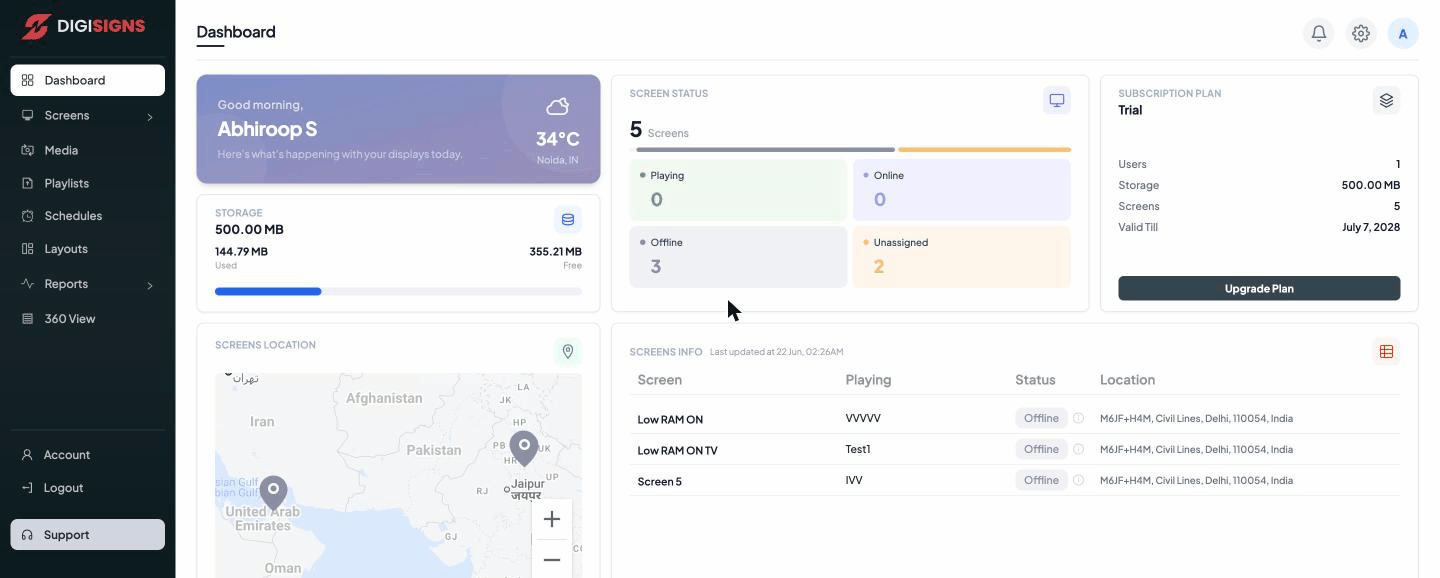
What's on the page
- Greeting & weather — a personalised greeting ("Good morning, …") along with the current temperature and conditions for your registered location.
- Screen status — your total number of screens, split into four states:
- Playing — actively displaying content right now.
- Online — connected but not currently playing.
- Offline — not reachable (powered off, no internet, or the player isn't running).
- Unassigned — registered but with no content/playlist assigned yet.
- Subscription plan — your current plan (for example Trial), with your Users, Storage, Screens, and Valid Till date. The Upgrade Plan button takes you to plan options.
- Storage — total storage allowance with Used and Free amounts and a usage bar.
- Screens location — a world map plotting the physical location of each screen, so you can see your deployment geographically.
- Screens info — a table of your screens showing what each is Playing, its Status, and its Location, with the time it was last updated.
Tip
If a screen shows Offline, check the player's power and internet connection first.
If it shows Unassigned, assign a playlist or schedule to it from the
Screens page.
Note
Trial accounts are limited (for example, 5 screens / 500 MB storage / 1 user). Use
Upgrade Plan to raise these limits.